Carl Rayner

CREATIVE TECHNOLOGIST  ·  MEDIA PRODUCER  ·  EDUCATOR

Kia ora, I’m Carl. I build useful software, develop practical AI workflows and produce professional media. My apps are used daily in classrooms and student television production. I bring over 20 years’ experience leading creative programmes, managing teams and budgets, and helping people put technology to work.

  • NameCarl Rayner
  • LocationNew Zealand

Built for real people, used in real work.
My classroom team of 20+ has used YumDonut for two years. It now works on the web and in Microsoft Teams.

Explore the work behind it →
Experience

Background

From hands-on work to programme leadership

My work connects software development, professional media production and more than 20 years in education across New Zealand and Singapore. I have managed Capital E SoundHouseNZ/MediaLab, led technology rollouts and developed student television programmes. I currently lead Berkley TV as Media Specialist Teacher at Berkley Normal Middle School, alongside building my own digital products.

Employment

Media Specialist Teacher 2024 - Present

Berkley Normal Middle School, Hamilton : New Zealand

• Developed and introduced a cross-school media curriculum
• Redesigned teaching, greenscreen and control-room spaces for media production
• Established and led the award-winning Berkley TV extracurricular television production programme and studio; YouTube subscribers grew from 200 to 1,410 during my leadership (September 2026)
• Led the development of four-camera live streaming using vMix, NDI and wireless video, with students directing, mixing, operating cameras and managing production logistics
• Winner of the New Zealand Blue Light 2024 National Film Festival

Classroom Teacher 2022 - 2023

St Francis School, Thames : New Zealand

• Designed curriculum, learning units and assessments around school requirements and student needs
• Rippa Rugby coach
• Google Super Admin and Digital Technologies Coach
• Established and managed the award-winning SFTV extracurricular television production programme and studio

Digital Technology Coach2016 - 2022

St Joseph's Institution International School, Singapore

Led school-wide technology adoption, staff coaching and digital curriculum development.
Planned the one-to-one Chromebook rollout, remote-learning provision and projection and sound upgrades.

Full role responsibilities

• Taught Digital Technologies across Grades 1–6, combining specialist sessions with lessons developed alongside classroom teachers
• Google Level One Educator - Certified
• Co-creator of the SJIIES Digital Technologies curriculum
• Introduced creative technology programmes in music, video, animation, 3D printing, app development and game design
• Rolled out the Common Sense Media Digital Citizenship programme
• Planned and supported the rollout of a one-to-one Chromebook programme
• Established SJIIES as Singapore's first Google Reference School
• Planned remote-learning provision and supported staff and students through its delivery
• Planned and oversaw school-wide projection and sound-system upgrades
• Provided staff development, coaching and mentoring in digital technology
• Ran practical technology support sessions for students
• Redesigned the school’s Digital Technology Lab twice to support changing learning needs
• Established the Elementary Tech Squad: student volunteers providing technology support across the school
• Worked with high-school technology staff to align curriculum across the school
• Worked with the Head of ICT on school-wide policies and procedures
• Worked with curriculum and technology leaders to rewrite and deliver the elementary Digital Technologies curriculum
• Led the school-wide introduction of Google Classroom and Google tools
• Worked with technology leaders and staff to introduce Seesaw across the school
• Led co-curricular Digital Technology programmes
• Completed EduCare course - "Child Protection for International Schools - Level 2"
• Completed Virtues Project course - "An Introduction to the Virtues Project"

Head of ESTV

Ran ESTV, from student training and production to studio development and budgets.
Produced promotional films with the Advancement and Communications Office.
Managed the school’s YouTube channel as it grew from 200 to 1,600 subscribers during my 2016–2022 tenure.

Full role responsibilities

• Co-founder, producer, director and teacher in charge of Elementary School Television (ESTV) — ESTV (archived website)
• Published contributions to Expat Living Magazine, Singapore
• Developed internationally recognised original programming
• Designed and project-managed the construction of a new ESTV production studio
• Trained students in filming, recording and editing
• Guided students in writing scripts for original programmes
• Supported students across graphic design, costumes, sets, project planning and time management
• Filmed and digitised school events, performances, classwork and service activities
• Produced promotional videos for the elementary and high schools with the Advancement and Communications Office
• Supported ESTV groups through regular lunchtime and after-school production sessions
• Developed and managed ESTV budgets
• Developed and managed the ESTV YouTube channel
• Managed the SJI International School YouTube channel, which grew from 200 to 1,600 subscribers during my 2016–2022 tenure

Manager2002 - 2015

Capital E SoundHouseNZ/MediaLab

Managed MediaLab staff, budgets, facilities and industry partnerships.
Designed and ran game design, animation, music production and movie-making programmes, reaching over 5,000 students annually from around the world.

Full role responsibilities

• Purchased, installed and maintained a networked Windows media lab
• Coordinated tutors and timetables; trained, supported and appraised MediaLab staff
• Designed and ran game design, animation, music production and movie-making programmes; all programme areas achieved sell-outs
• Provided online and in-person support for programmes and software
• Maintained national and international partnerships, including Sony Creative Software, Roland International, Intelliware Australia and RockShop New Zealand
• Developed and managed MediaLab budgets
• Established and managed MediaLab’s web presence
• Coordinated national media coverage of MediaLab
• Founded and mentored a national music, dance and technology scholarship programme
• Board member of the International Soundhouse Alliance
• Winner of the ‘Absolutely Creatively Wellington Awards’ 2004
• Established and supported a second New Zealand Soundhouse in Auckland
• Managed a programme reaching over 5,000 students annually, welcoming students from around the world, and delivered learning experiences under a national Ministry of Education contract
• Published contributions to national curriculum documents relating to Music and Technology

HOD Performing Arts1998 - 2001

Berkley Normal Middle School, Hamilton : New Zealand

Led Music and Performing Arts, combining creative direction with staff, programme and budget responsibilities.

Full role responsibilities

Led Music and Performing Arts, combining creative direction with staff, programme and budget responsibilities.
Responsibilities included:
• Developing and evaluating teaching programmes
• Mentoring the school's bands and various performing groups
• Managing and conducting the school orchestra
• Organising after-hours, on-site, sold-out public performances featuring a wide variety of student performers
• Financial administration including budget preparation
• Staff selection, appraisal and development
• Research and design of the school's new Performing Arts facility
• Facilitating meetings, organising school-wide events and assemblies
• Subject and timetable coordination
• Website and intranet development
• Coordinating the itinerant music programme
• Parent information evenings, and monitoring student performance

Classroom Teacher1997

St Joseph's School, Hamilton : New Zealand

• Taught integrated studies in Years 5–6
• Led school music and intranet systems
• Held leadership responsibilities in Physical Education and Music

Education

1998

Teacher Registration

New Zealand


1997

Bachelor of Education

Waikato University


1997

Diploma of Teaching

Waikato University


Contact details

Portrait of Carl Rayner
Save contact details

My Skills

Software Skills

  • Davinci Resolve
  • Blackmagic Fusion
  • After Effects
  • Photoshop
  • Premiere
  • Animationish
  • Wordpress
  • iClone
  • Reaper
  • Garageband
  • iMovie
  • Logic Pro
  • App Inventor
  • Scratch
  • Atmosphir
  • RPGMaker VX
  • Unity3D
  • Unreal Engine
  • WeVideo
  • CoSpaces
  • Google Apps
  • Google Classroom
  • Seesaw
  • ClassDojo
  • Microsoft Office
  • Windows Server
  • Windows OS
  • Mac OS

Technology Experience

  • Filming
  • Audio Production
  • Android
  • iOS
  • Oculus Rift
  • Raspberry Pi

Coaching Skills

  • Badminton
  • Cricket
  • Soccer
  • Touch rugby

Teaching/ Management Strengths

  • Curriculum
  • Training
  • Networking
  • Teaching
  • Management
  • Budgets
  • Projects


How I work

Build useful things

I turn a specific problem into working software, using AI-assisted development and refining the controls, feedback and workflow around the person using it.

Make the story clear

I bring together video, sound, motion graphics and live production to take a story from an initial idea to a finished piece for its audience.

Help others create

I develop programmes, studios and practical training that help people build confidence and create work for a real audience.

Explore my projects on GitHub →

Portfolio

Useful software.
Powerful storytelling.

I build digital tools, produce media and lead creative programmes. Explore the work—and the decisions, people and results behind it.

Software & AI in practice

Tools used daily across Berkley classrooms and in TV production. Built with AI assistance; AI-powered features are identified in each project.

Illustrated attendance workflow from absence email to checked eTap update and staff handover

In use · operational automation

Attendance workflow automation

I proposed, built and maintain a Gmail-to-eTap workflow that handles routine absence entries and flags exceptions for staff.

The attendance officer reports saving over an hour per school day, closer to two. Rules-based operation, built with AI assistance.

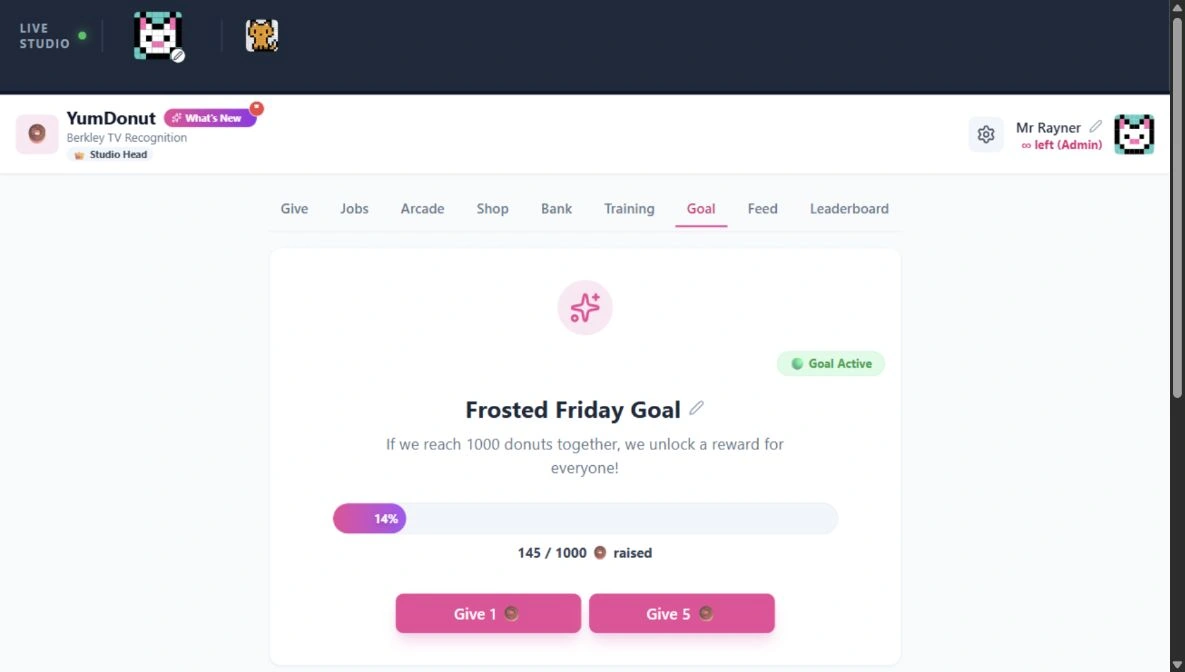
YumDonut’s shared team goal showing progress towards 1,000 donuts and contribution controls

Two years in use · Web + Microsoft Teams

YumDonut

A recognition system built for my classroom team of 20+: celebrate contributions and shared values, then put earned donuts towards team goals.

My work & project notes

I built YumDonut to meet our recognition needs without subscribing to a service such as HeyTaco. The standalone app and Teams integration share recognition records, balances and activity.

My students and I have used YumDonut for two years. Both the web app and Teams integration are now in use; that history refers to the product overall. The app link opens participant sign-in.

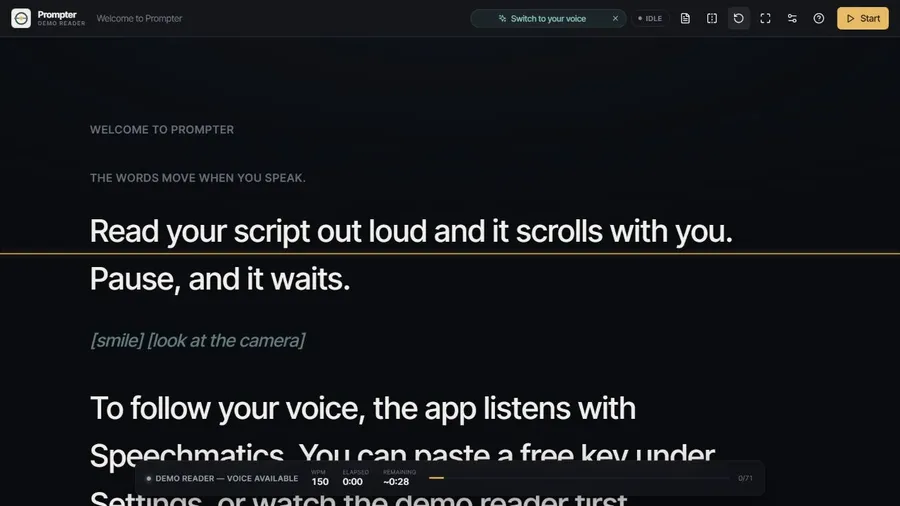
Prompter’s script view, reading guide and rehearsal controls

Working browser demo

Prompter

A teleprompter built around the presenter’s delivery, with voice following, a demo reader and mirrored display for presentations, training and video production.

My work & project notes

I developed the app and refined its reading behaviour: keeping the eyeline steady, preserving punctuation and allowing manual repositioning without fighting the scroll.

Voice following uses Speechmatics speech recognition and requires microphone access and a service connection. The browser demo runs without a microphone. Voice performance depends on the device and connection.

Classroom dashboard with sample lesson instructions, a clock, a five-minute timer and a group-work cue

One year in use · Teacher dashboard

ClassroomScreen

One screen for everyday classroom routines: arrange instructions, timers and working-mode cues, then save the layout for another lesson. Used by me and other teachers for a year.

My work & project notes

I built this dashboard to meet our classroom needs without a paid subscription. It is my independent project, inspired by the commercial Classroomscreen product.

I brought movable tools, saved layouts and scheduled switching into a shared workspace. Layouts are stored in the browser, with export/import for moving them between devices.

The screenshot shows a sample lesson in the live app. My colleagues and I have used the project for a year, as of September 2026.

SketchMotion drawing workspace with a circle, tools and frame timeline

Working browser app

SketchMotion

A drawing and animation workspace for turning a rough idea into movement: sketch, build frames and play the sequence back.

Related tool: Maze Flow — Wacom pen practice for my students’ 2D animation project.

My work & Maze Flow

I developed the drawing and animation workflow, with a shared background and a separate drawing layer for each frame. Recent refinements clarify those layers and use project names for exports.

Projects autosave in the browser and can be saved as files. Export options include images, GIF and WebM. Longer animations can take time to export; browser storage is not a substitute for saving a copy.

Maze Flow: practice before production. I built this game so students can practise guiding a Wacom pen through a maze during our 2D animation project. Immediate feedback when the path touches a wall turns pen control into a focused, playful exercise.

SketchForge Learn screen showing the guided basics tutorial added in Carl’s version

Ongoing development · derived project

SketchForge 3D

Extending a browser 3D editor with guided learning, project handling and interaction refinements that make modelling more approachable.

Original application by Formsmith746. My version extends that work.

My improvements & original credit

The original project supplies the core 3D workspace, shapes, solid/hole modelling and model import/export. My additions include guided tutorials, project save/open, printable starter parts and refinements to placement, rotation and camera controls.

My branch derives from an MIT-licensed version. The upstream project has since changed licence. See the licence for my version and the original base licence. Screenshot credit and licence: SketchForge contributors. This remains a work in progress.

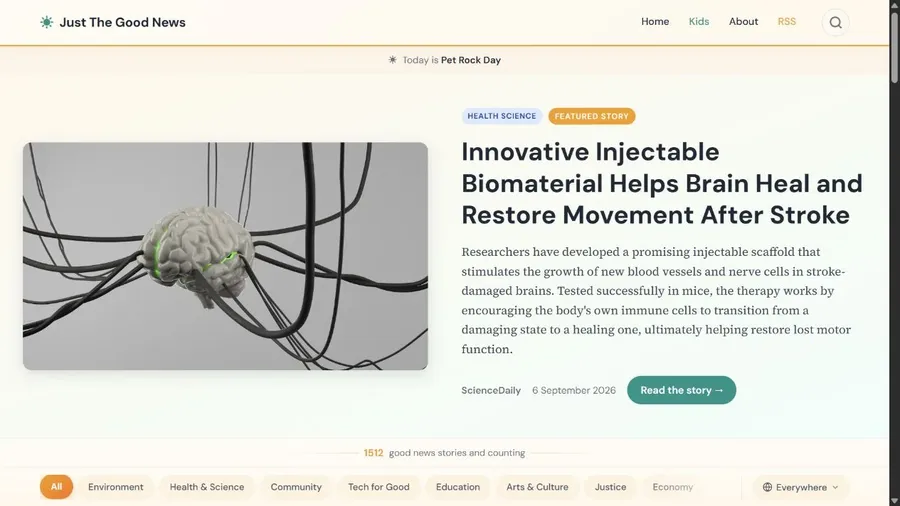
Just the Good News website with featured story, topic filters and source links

Live website

Just the Good News

An AI-assisted publishing workflow that gathers positive reporting into a readable website, with topic browsing, search and links to original sources.

My work & project notes

I built the site around a simple idea: make constructive stories easier to find while keeping their sources visible. The live site includes a Kids section and identifies its content as AI-curated and AI-summarised.

The site gathers stories from RSS feeds and uses AI to select and summarise them, keeping links to the original reporting. Automated updates build the site and publish it through GitHub Pages.

Image Optimizer Studio showing compression presets, output formats and the image upload workspace

Live web app · also runs locally

Image Optimizer Studio

A focused workflow for preparing web images: batch compression, resizing and format conversion, with before-and-after file information and a local processing option.

My work & project notes

I built the interface and local processing workflow around existing image codecs. The design brings compression presets, output choices and per-file savings into one place. It needs a local server or a compatible host; this is not a browser-only compressor.

Try the hosted app, or run it locally to process images on your own machine. The hosted version processes uploaded images on its server and may take a moment to wake up. Compression results depend on the source image and settings.

Creative communications & student media

Berkley school website desktop view with full navigation, campus aerial image and family links

My design, development & production

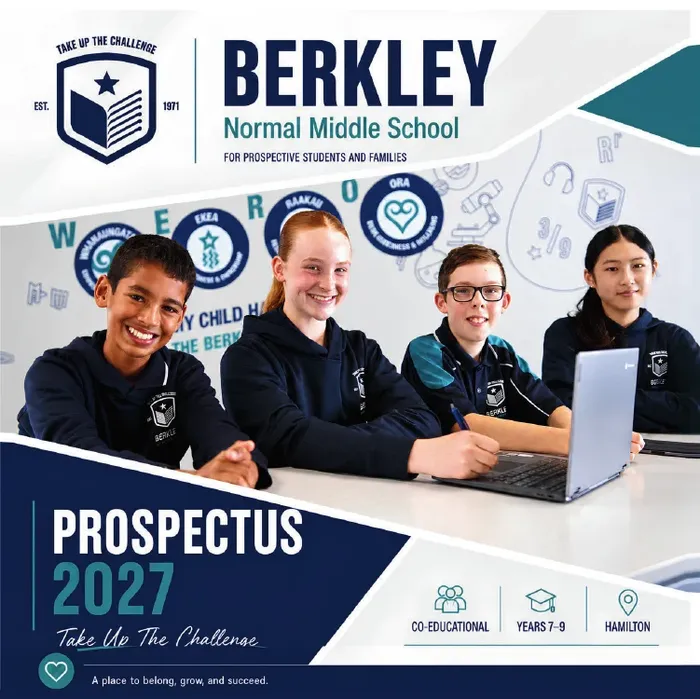
Berkley: website & prospectus

I proposed bringing the work in-house, then delivered website design and rebuilt pages, a campus map with 360° views, zone and bus finders, and a prospectus I wrote, photographed and designed.

Savings helped fund a new camera. I continue to develop the website and tools; the supplier built the underlying backend.

Watch A Day in My Life at Berkley Normal Middle School, by Berkley TV

Programme founder & mentor

Student voices, real productions

I established ESTV, SFTV and Berkley TV. I lead the programme, training and production standards; students take the creative lead. At Berkley, that includes four-camera live broadcasts. At SJI International, the school’s YouTube channel grew from 200 to 1,600 subscribers during my 2016–2022 tenure.

Featured: A Day in My Life at Berkley Normal Middle School. Students create the work, with my teaching and production guidance. At Berkley TV, subscribers have grown from 200 to 1,410 during my leadership (September 2026).

Watch Carl’s What is Capital E motion graphics work

Professional media production

Stories shaped for their audience

My production work spans motion graphics, promotional video, music video and live shows. This Capital E piece brings visual storytelling and sound together to explain creative learning.

The gallery includes my production credits, alongside clearly labelled student work and programme coverage.

Contacts

Let’s talk

Hiring for custom software, practical AI or professional media production? Tell me what your team needs to achieve, and let’s explore where I can contribute.

Based inHamilton, New Zealand